Zoo Webcams: Find and Verify Official Animal Streams
The most reliable way to watch a zoo webcam is to verify the stream on the zoo or wildlife organization’s own website. A map-based directory such as GlobeWebcams can help with discovery, but streams can move, go offline, or change provider, so the original source should be checked before treating a listing as current.
TL;DR:
- Most official zoo websites organize live camera feeds under clearly labeled sections like “Webcams” or “Live Cameras,” making them quick to find through navigation menus or internal search functions.
- Reliable streams are best viewed on updated browsers with a strong internet connection, using wired or high-speed Wi-Fi, and adjusting quality settings to prevent buffering during peak times.
- Zoo webcams often follow the facility’s operating hours, with animals moving in and out of view, and technical issues caused by weather or maintenance can temporarily disable streams.
- Built-in alerts and social media updates help track animal activity or special events, but official zoo pages and verified sources provide the most accurate information.
- GlobeWebcams provides geographic webcam discovery, but this does not establish current zoo or aquarium coverage. Check the zoo’s official camera page directly.
For broader outdoor views, browse the GlobeWebcams map. Dedicated zoo coverage is not guaranteed.
Explore the interactive mapTable of Contents
- Where to find reliable zoo live cams and how to reach them quickly
- Best viewing setup: devices, browsers, and bandwidth for smooth streams
- Why a zoo webcam might be quiet or offline and how to check status
- How to set up notifications or alerts for live cam events or animal activity
- Tips for best viewing experience including time of day and special events
- Community and social features around zoo webcams
- What the GlobeWebcams directory can and cannot confirm
- Authoritative live-cam pages to open now
- FAQ
Where to find reliable zoo live cams and how to reach them quickly
Start with the zoo itself. Most major zoos and aquariums run dedicated webcam sections, usually reachable from the main navigation menu under a label like “Live Cams,” “Webcams,” or “Animal Cams.” The San Diego Zoo Wildlife Alliance educational resources include access to live animal cams, illustrating how an official organization can host multiple species-focused streams. Large zoos tend to aggregate several feeds on one landing page, which is often the quickest way to browse everything the zoo offers without hunting through separate pages.
A few practical ways to reach a feed fast:
- Go straight to the zoo’s official website and look for a top-level menu item such as “Webcams” or “Live Cameras.”
- Use the site’s own search box and type the animal name plus “cam” (for example, “penguin cam”) to skip past general zoo information.
- Try a browser search with Ctrl+F (or Cmd+F on a Mac) once you land on a long zoo page, searching for “cam” or “live” to jump straight to the embedded player.
- Use a map-based directory to search by country, city, or category, then follow the link through to the original provider’s page.
Aquariums and wildlife parks often host species-specific streams that work the same way. Penguin colonies, sea otter habitats, and gorilla enclosures are common subjects for these dedicated pages, and they’re usually built around a single animal group rather than the whole facility.
A directory adds value mainly when you don’t already know which zoo to check, or when you want to compare cams across several countries in one sitting. Instead of searching “zoo webcam” repeatedly and sorting through unofficial reposts, a map interface lets you filter by place or category and click through to the source. That matters because plenty of zoo footage gets re-uploaded on unofficial channels without permission, and those copies are more likely to be outdated, low quality, or simply offline. Checking the zoo’s own support and membership pages can also confirm whether a webcam section is still active, since these pages often list operational updates alongside donation and visit information.
Best viewing setup: devices, browsers, and bandwidth for smooth streams
A smooth zoo cam stream depends more on your setup than on the camera itself. Before tuning in, run a quick internet speed test. Standard-definition streams generally need moderate internet speeds, while high-definition streams require a faster connection for smooth playback. If your connection tests below that on a shared home network, expect some buffering during peak hours.
A few setup habits make a real difference:
- Use an updated version of Chrome, Edge, or Safari, since older browser versions can struggle with modern video players.
- Connect your desktop or laptop by wired ethernet when possible, or use 5GHz Wi-Fi instead of the slower 2.4GHz band.
- On a phone or tablet, a mobile hotspot with a strong signal often outperforms public Wi-Fi at busy locations.
- Turn on hardware acceleration in your browser’s settings if the player looks choppy, since this shifts video decoding to your device’s graphics hardware.
- Switch to full-screen or picture-in-picture mode for a cleaner view, and check your browser isn’t blocking autoplay if the stream won’t start.
On cellular data, dial down stream quality manually if the player offers the option, since HD zoo footage adds up quickly against a data cap and drains battery faster than a lower-resolution stream.
Pro Tip: If a stream keeps buffering, close other browser tabs and pause any background downloads before refreshing the page, since bandwidth competition on your own device is often the real bottleneck.
Why a zoo webcam might be quiet or offline and how to check status
A blank or empty enclosure on a live cam doesn’t mean the camera is broken. Zoo cams generally follow the facility’s operating hours, so a stream may go dark overnight or before opening time. Animals also move in and out of camera range on their own schedule: many spend part of the day indoors, in shaded areas out of frame, or temporarily under veterinary care, none of which show up as an error message.
Technical issues do happen too. Planned maintenance, severe weather, or a connectivity problem at the zoo’s end can take a stream offline for hours or longer.
- Check the zoo’s official website or social media accounts for notices about maintenance windows or temporary outages before assuming the feed is permanently down.
- Look for a visible provider name or logo on the video player itself, since authorized feeds usually display the zoo’s or aquarium’s branding rather than a generic wrapper.
- Confirm the page you’re on sits on the zoo’s own domain, or check a directory’s source metadata to see which provider the feed links back to.
- Treat a webcam as a window for casual viewing, not a tool for travel, road conditions, or safety decisions. Zoo hours, closures, and visitor alerts belong on the facility’s official notices, not on camera footage.
How to set up notifications or alerts for live cam events or animal activity
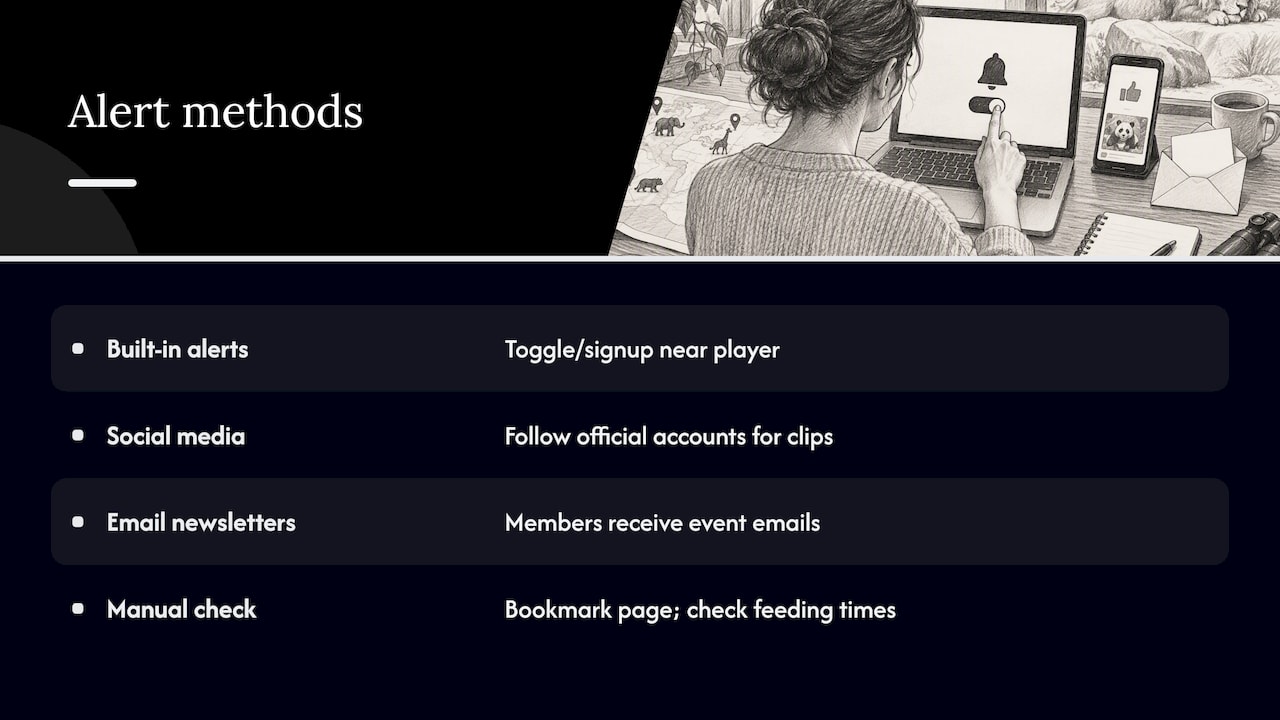
Some zoo webcam pages include built-in features for daily highlights or activity alerts tied to a specific animal cam, letting you know when something notable happens without watching the feed continuously. Where a zoo offers this, it’s usually listed directly on the same page as the stream, often as a toggle or sign-up box near the video player.
Outside of page-specific alerts, the most reliable method is following the zoo’s or aquarium’s official social media accounts, which commonly post short clips or announcements when a cam captures something worth sharing, such as a new birth, a feeding session, or a veterinary checkup streamed live. Many zoos also send email newsletters to members that flag upcoming events tied to specific enclosures, so checking a membership or visitor page can reveal whether that option exists.
If a zoo doesn’t offer built-in alerts, a simple workaround is bookmarking the specific cam page and checking back around known activity windows, such as feeding times, which most zoos list on their general visitor information pages. Since animal behavior varies by species and by day, there’s no universal schedule that guarantees action, but checking during daytime hours when the facility is open gives you the best odds.
Tips for best viewing experience including time of day and special events
Daytime hours during the zoo’s normal operating schedule are the most reliable window for activity, since that’s when most animals are out of indoor holding areas and staff are present for feeding and enrichment sessions. Early morning and late afternoon often show more movement than midday, when many animals rest during warmer hours.
Feeding times are worth checking specifically if the zoo publishes them, since that’s when even normally quiet animals tend to appear on camera. Special events, such as a new arrival, a public naming vote, or a scheduled veterinary exam streamed live, tend to draw more attention and are usually flagged in advance on the zoo’s website or social accounts.
Weather also plays a role for outdoor enclosures. Heavy rain or extreme heat can push animals into indoor shelters that aren’t covered by an outdoor cam, so a quiet stream on a stormy day is often just the animal staying comfortable rather than a technical problem. If you’re checking a specific species and the enclosure has both indoor and outdoor cams, switching between them can help you find where the activity actually is.
Community and social features around zoo webcams
Many zoo webcam pages include a comment section or chat feature alongside the video player, where viewers share what they’re seeing in real time, from a penguin diving to a new cub’s first steps outside. These features are usually built into the zoo’s own site or hosted through a third-party video platform like YouTube, where the zoo’s channel comment section doubles as an informal viewer community.
Social media adds another layer. Zoos and aquariums frequently post clips pulled from their live cams, and viewers often tag or reply with questions about specific animals, creating an ongoing thread separate from the live stream itself. Dedicated fan communities also form around especially popular cams, particularly panda and penguin streams, where regular viewers share screenshots or notable moments across forums and social platforms.
None of this replaces the zoo’s own official information, so treat community chatter as a fun supplement rather than a source for facts about an animal’s health, schedule, or the camera’s operating status. For anything that matters, the zoo’s own page or verified social account is the more dependable reference.
What the GlobeWebcams directory can and cannot confirm
GlobeWebcams organizes available public cameras by country, place and category. Its directory should not be treated as a verified list of zoo cameras: use the zoo’s own website for the animal stream you want.
Every webcam page on the platform links back to the original provider, and GlobeWebcams applies availability and quality checks before listing a feed, an approach detailed on its sources page. That matters for zoo cams specifically, since unofficial reposts are common and often lag behind or disappear without notice.
Start at the GlobeWebcams map for general geographic discovery, or browse the nature webcam directory. Neither promises zoo coverage or animal sightings. For a specific zoo stream, bookmark the official zoo page. Read our listing methodology for the limits of directory checks.
Authoritative live-cam pages to open now
- The San Diego Zoo Wildlife Alliance hosts named live cams for pandas, koalas, penguins, and elephants.
- The GlobeWebcams map is a directory of public geographic views, not a guaranteed fallback for a missing zoo or aquarium stream.
FAQ
Is there a live penguin cam I can watch right now?
Several zoos and aquariums run dedicated penguin cams, though availability depends on the facility’s operating hours and whether the birds are visible outdoors at that moment. Check the specific zoo’s official webcam page for the current status rather than assuming a stream is always active.
Why is a zoo webcam showing an empty enclosure?
An empty-looking enclosure usually means the animal is indoors, resting out of frame, or the facility is outside its operating hours rather than a broken camera. Weather and scheduled veterinary care can also keep animals away from an outdoor camera’s view.
How do I know if a zoo webcam is official?
Look for the zoo’s own branding on the video player and confirm the page sits on the zoo’s official domain, or check a directory’s source attribution to see which provider the feed links back to. GlobeWebcams applies this kind of check before listing a feed and links directly to the original source.
What internet speed do I need for a smooth zoo cam stream?
Standard-definition streams generally need moderate internet speeds, while high-definition streams require a faster connection for smooth playback. Testing your connection before starting a stream can help you decide whether to lower the quality setting.
Can I get notified when a zoo cam shows animal activity?
Some zoo webcam pages include built-in alerts or daily highlights tied to a specific cam, usually listed near the video player itself. Following the zoo’s official social media accounts is a reliable alternative, since many post clips when a cam captures notable activity.
Recommended
Webcam availability and conditions can change without notice. GlobeWebcams does not operate most listed cameras; feeds and imagery remain under the control of their original providers. Do not rely on webcam imagery alone for weather, road, travel or safety decisions.