How to Find Live Webcams Worldwide, by Place or Category

The fastest way to find live webcams is to start from what you want to see, not from the word “webcam”. Pick a place, a landmark or a type of view (snow, surf, traffic, skyline), then browse a directory or map that sorts cameras that way and sends you to the original provider. Then check that the feed is actually updating before you trust it.
This guide walks through each way of searching, the checks that separate a working camera from a stale one, and how to use webcams for trip planning without leaning on them too hard.
GlobeWebcamsglobewebcams.comFind Webcams by Place or ViewExplore public or authorized webcams by location, country, category or source, then visit original providers to check current views.Explore webcams on the mapTL;DR
- Search by place first (country, city, park, harbor), then narrow by category such as weather, nature, traffic, water or city landmarks.
- A map-based directory such as the GlobeWebcams worldwide webcam map lets you find cameras near a spot you are already thinking about.
- Always go to the original provider’s page: it tells you who runs the camera, how often it refreshes and what it is allowed to show.
- Confirm a feed is live by looking at it twice, several minutes apart. Moving clocks, changing light or traffic prove it; an identical frame does not.
- Use webcams as one input for planning. For weather, road and safety decisions, rely on official forecasts and agency alerts too.
Table of Contents
- What “live” means for a webcam
- Ways to find live webcams online
- Match the method to what you need
- How to tell whether a webcam is really live
- What to check about the source, delay and privacy
- Using webcams to plan a trip or check conditions
- Where GlobeWebcams fits
- A short checklist before you trust a webcam
- FAQ
- Sources
What “live” means for a webcam
A live webcam can be one of three things, and the label on the page rarely tells you which.
- A streaming video feed. Continuous video, usually with a short delay. One streaming provider says its live video runs roughly 20 to 30 seconds behind real time because of how chunked HTTP/HLS delivery works, and that cutting the delay can hurt quality and stability. A half-minute lag is normal and not a sign of a broken camera.
- A refreshing still image. A photo that updates every few seconds, minutes or longer. Road, weather and mountain cameras often work this way. The refresh interval matters more than the picture quality.
- A time-lapse or looped recording. A clip that replays. Some are labeled clearly, others are not.
This is why a webcam directory should not simply promise that every camera is on right now. Cameras are owned and run by other organizations: transport agencies, tourism boards, ski areas, parks, universities, hotels and private operators. Whether a given camera is working today depends on them. When we say a page is current, we mean the source says so, and we link back to that source so you can see for yourself.
Ways to find live webcams online
There are five practical routes. Which one fits depends on how much you already know about where you want to look.
1. Browse a worldwide map
If you know roughly where, but not which camera, a map is the quickest tool. Zoom to a coastline, a mountain range or a city and see which cameras exist nearby. This is useful when you are comparing destinations or want a view of a place that is not famous enough to appear in a search for its name.
The GlobeWebcams map is built for this: you move around the globe and open dedicated location pages instead of scrolling a single long list.
2. Go through a directory by country and category
Directories suit open-ended browsing. You choose a country, then a category, and work through what is there. The public webcam directory is organized this way, and it is paginated, so later pages (page 2, page 3 and beyond) reveal cameras that do not make the first screen. Browsing a few pages deep is how you find the less obvious views: a harbor, a mountain pass, a small-town square.
Categories worth knowing:
- Weather and outdoor conditions: sky, cloud cover, visible snow on a slope, wind on the water.
- Nature and scenic views: lakes, forests, wildlife areas, coastlines.
- Water and beaches: surf breaks, harbors, rivers, bays.
- Traffic and roads: highway and city junction cameras, usually from transport agencies.
- Landmarks and cities: skylines, squares, bridges, famous streets.
- Volcanoes and geology: cameras pointed at craters and ridges, typically run by monitoring agencies or research groups.
3. Search by landmark or place name
When you already have a destination, searching its name plus a type of view usually works better than a bare “webcam” query. Try the name of the beach, the pass, the plaza or the peak, and add a word like “camera” or “view”. Results from the organization that manages the place tend to be the most reliable, such as a port authority, a city, a national park or a ski resort.
You will notice the top results for general searches are often city skyline cameras and regional collections. That makes sense: those are heavily maintained and widely linked. But they are a narrow slice of what exists.
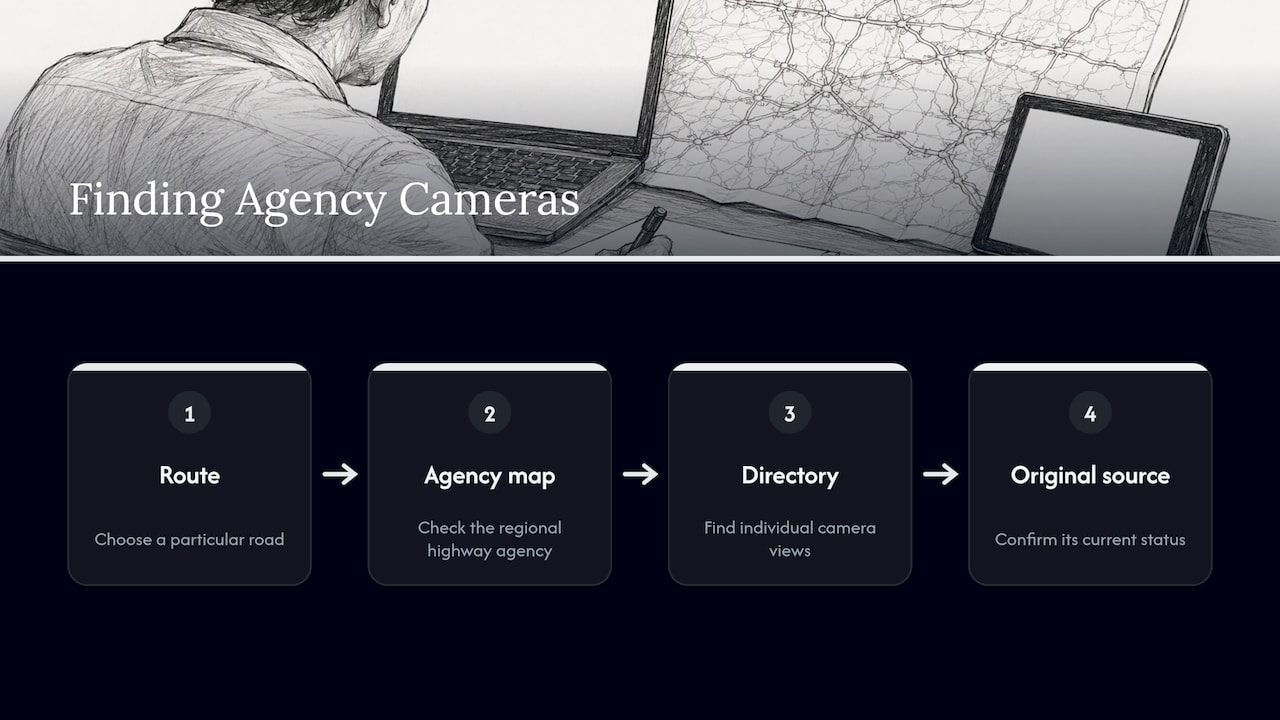
4. Start from the agency that runs the camera
Some of the most dependable cameras belong to public bodies whose job is to watch conditions: transport departments, weather services, park agencies, volcano observatories. If you want road conditions on a particular route, the highway agency for that region usually publishes its own camera map, and a directory can point you toward individual views too. Our directory includes road cameras from the Finnish transport network, for example the Vermo camera in Leppävaara, the Hii E1 camera in Kauniainen and the VUO GUM camera in Länsimäki. Each page links back to the original source, which is where you confirm its current status.
5. Use local tourism and resort pages
Tourism boards, ski resorts, marinas and surf schools often run their own cameras and publish them on a conditions page. These tend to be the most useful for a specific plan, such as whether a beach is crowded or a slope has snow cover. A directory helps you discover them, and the provider’s own page gives the context a bare image lacks.
Match the method to what you need
| What you want | Best starting point | What to check on the source page |
|---|---|---|
| A feel for a destination before booking | Map or country page | Time of day shown, season, how recent the image is |
| Weather or sky conditions at a spot | Category browse, then the provider | Refresh rate, camera direction, timestamp |
| Snow, surf or beach conditions | Category browse, resort or beach operator page | Whether it is a still or a stream, lighting at night |
| Road or traffic view | The transport agency’s page | Agency attribution, update interval |
| A famous landmark or skyline | Landmark or city page | Stream versus still, time of day, camera direction |
| Something unusual (volcano, wildlife, harbor) | Directory pages by category | Who operates it and whether it is seasonal |
How to tell whether a webcam is really live
A picture that looks fine can still be hours old. A simple method, described in a developer’s write-up on checking 24/7 webcams, is to look at the same feed twice, separated by real time, with about ten minutes being enough. A live feed shows something that has moved on: an advancing timestamp, changed readings, a different frame. A loop or frozen image repeats the same frame or shows a stuck clock.
Here is how that works in practice.
- Open the camera and note a few details. Pick things that change: a clock or timestamp overlay, the position of vehicles or boats, shadows, cloud shapes, people.
- Wait ten minutes or so, then reload or look again.
- Compare. If shadows have moved, cars have changed, and the timestamp has advanced, the feed is updating. If every detail is identical, treat it as stale.
- Check against local time. Daylight at the camera should match the hour where it sits. A sunny scene at what should be midnight there is a warning sign.
- Look for a night mode. Many cameras go dark or switch to infrared after sunset. That is normal, but a feed that stays on a bright daytime frame all night is not live.
Two cautions. A timestamp burned into the image can itself be stale or wrong, so it is better as one clue among several. And this test only tells you the feed is moving. It says nothing on its own about what the conditions are like standing there: water speed, wind direction, ice under a bridge or the state of a trail.
What to check about the source, delay and privacy
Before you rely on any webcam, look at the page it comes from.
Who runs it
A camera run by a transport agency, a park, a harbor authority or a resort has a clear owner who is responsible for it. Ask yourself whether the page names that owner. GlobeWebcams does not own or operate the cameras it lists. We link each page back to the original provider and apply source-rights, availability and quality checks before publishing it, so that you can go straight to the operator for details.
How old the view is
Streams commonly carry a small delay, as the provider FAQ above explains. Still-image cameras can be minutes behind. For a quick look at a skyline, that is irrelevant. For a time-sensitive decision, like whether to drive a mountain road this hour, it matters, and it is one more reason to check the official source too.
What the camera is allowed to show
The fact that a camera is publicly accessible does not automatically mean its images can be copied, reposted or reused. Responsible directories link to the original and respect the provider’s terms. As a viewer, the same logic applies: watch on the provider’s page, and do not download and republish footage without checking the terms. Reputable public cameras are set up with wide views that do not identify individuals. If you come across a camera that appears to point into private spaces, leave it alone and tell the operator.
Whether it is seasonal
Some cameras are switched off in winter, powered by solar panels that struggle in low light, or only run during a resort’s operating season. If a camera you liked last summer is blank, that does not always mean it is permanently gone. Check the operator’s page.
Using webcams to plan a trip or check conditions
Webcams are good for the visual side of planning, and a few habits make them better.
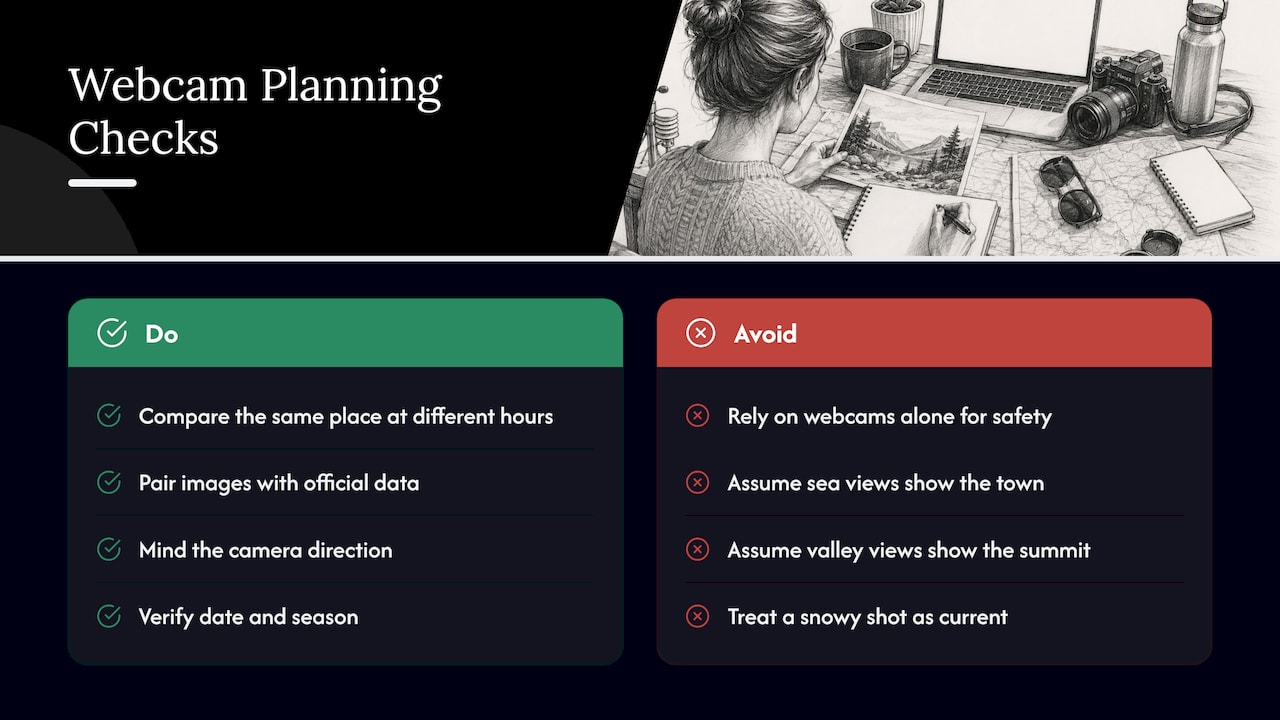
Compare the same place at different hours. A beach at dawn and at midday are different places. Looking at a camera at several times of day shows you light, crowds and rhythm.
Pair the picture with official data. A camera shows the sky now. A forecast from the national weather service in the country you are visiting shows what is coming. For roads, the transport agency’s alerts and closures take precedence over any single image. For coastal and mountain activities, local safety bulletins and the operator’s own notices are the authority. Webcam imagery should never be the only thing you use to decide whether it is safe to drive, hike, swim, ski or sail.
Mind the camera direction. A view facing the sea says little about the town behind it. A camera on a valley floor can look clear while the summit is in cloud.
Check the date and season. A shot of a snowy square might be live, or it might be your memory of what the square looks like in winter. Confirm with the freshness checks above.
Use time zones. If it is late evening where you are, it may be morning at the camera. Plan to look when the place is lit and busy.
Examples of useful pairings
- Weekend trip to a coastal town: open the harbor and beach cameras for a sense of crowds, then read the local forecast and any marine advisory before you commit.
- Winter drive over a pass: look at the road camera for a visual cue, then check the official road-condition report and closures before leaving.
- Choosing between two cities: watch each main square at the hour you would be there to see the atmosphere, then move on to budget, transit and weather averages.
- Armchair exploring: follow a category such as nature or volcano views and see what is on across the world while it is day in one place and night in another.
Where GlobeWebcams fits
If you want to find webcams without bouncing between dozens of separate sites, we built GlobeWebcams for that. You can start on the worldwide webcam map to explore by location, or open the public webcam directory to browse by country and category. Every entry links to the original provider, so you can see who runs the camera and what it shows before you rely on it. We only list public or authorized sources and run conservative availability and quality checks before publishing a page, but a camera’s status can change at any time, so the provider remains the best place to confirm it.
A short checklist before you trust a webcam
- Do you know who operates it?
- Does the image change when you look again ten minutes later?
- Does the light match the local time?
- Do you know whether it is a stream, a still or a loop, and roughly how often it updates?
- Is the camera pointed at the thing you actually care about?
- Have you checked the official forecast, road report or safety notice for the same place?
- Are you viewing it on the provider’s or directory’s page, rather than a copy of unclear origin?
FAQ
How do I find webcams near a specific place?
Use a map-based directory and zoom to the area, or open the country and category pages for that region. You can also search the place name with a word like “camera”, and look for results from the organization that manages the location, such as a port, park, resort or transport agency.
Are live webcams really live?
Some are continuous streams with a short delay, some are still images that refresh every so often, and some are loops. To check, look at the same feed twice about ten minutes apart and see whether the timestamp, light and activity have moved on. If nothing has changed, the feed is probably stale.
Can I use a webcam to check weather or road conditions?
It can give you a helpful visual impression, but it should not be your only source. Pair it with the official forecast, road report or local safety notice for the same place, especially before you drive, hike, swim or head into the mountains.
Why is a webcam I found earlier now blank or offline?
The operator may have switched it off for maintenance or the season, or it may have lost power or connectivity. Check the original provider’s page for notices. If it stays down, look for another camera nearby in the directory.
Can I download or share webcam footage?
Not automatically. Public access does not mean permission to copy or republish, so check the provider’s terms first. The safest option is to watch on the original page or share a link to it.
Sources
Recommended
Webcam availability and conditions can change without notice. GlobeWebcams does not operate most listed cameras; feeds and imagery remain under the control of their original providers. Do not rely on webcam imagery alone for weather, road, travel or safety decisions.