City Walking Tour Videos: How to Choose and Use Them

A city walking tour video is a recording, usually shot in first person, that follows a route through streets, squares and neighborhoods so you can see them from your screen. The best ones run in real time, keep the ambient sound and let you pause whenever you like. They are excellent for previewing a place and poor at telling you what the street looks like right now. This guide shows how to pick good ones, how they differ from live webcams and guided tours, and how to combine them with current sources before you travel.
GlobeWebcamsglobewebcams.comSee the City as It Is NowPair a recorded walking tour with current views from public or authorized webcams, browsed by location on an interactive global map.Explore webcams on the mapTL;DR
- A walking tour video is a recording from a past day. A live webcam is a fixed camera showing a view that updates. Use videos to learn a place and webcams to glance at it now.
- Check the upload or filming date, the route, whether the footage is continuous and what the sound is like before you commit to a long video.
- 4K describes image sharpness, not the quality of the route or the filming. It needs a steady connection and a screen that can use it.
- Never decide on weather, roads or safety from a video or a webcam image alone. Use official forecasts and traveler information services.
- On GlobeWebcams you can browse public and authorized webcams by country and place, with a link back to each original provider.
Table of Contents
- What counts as a city walking tour video
- Walking videos, live webcams and guided tours compared
- How walking videos help you explore and plan
- What to check before you press play
- What 4K really means for a walking tour
- Watching on a TV, computer or treadmill
- Can a walking video show current weather or street conditions?
- From a recorded walk to a current view
- Find live views alongside your walking videos
- Rights and etiquette when you watch and share
- Beyond city streets
- FAQ
- Sources
What counts as a city walking tour video
The label covers a few different things, and the search results for this topic mix them together.
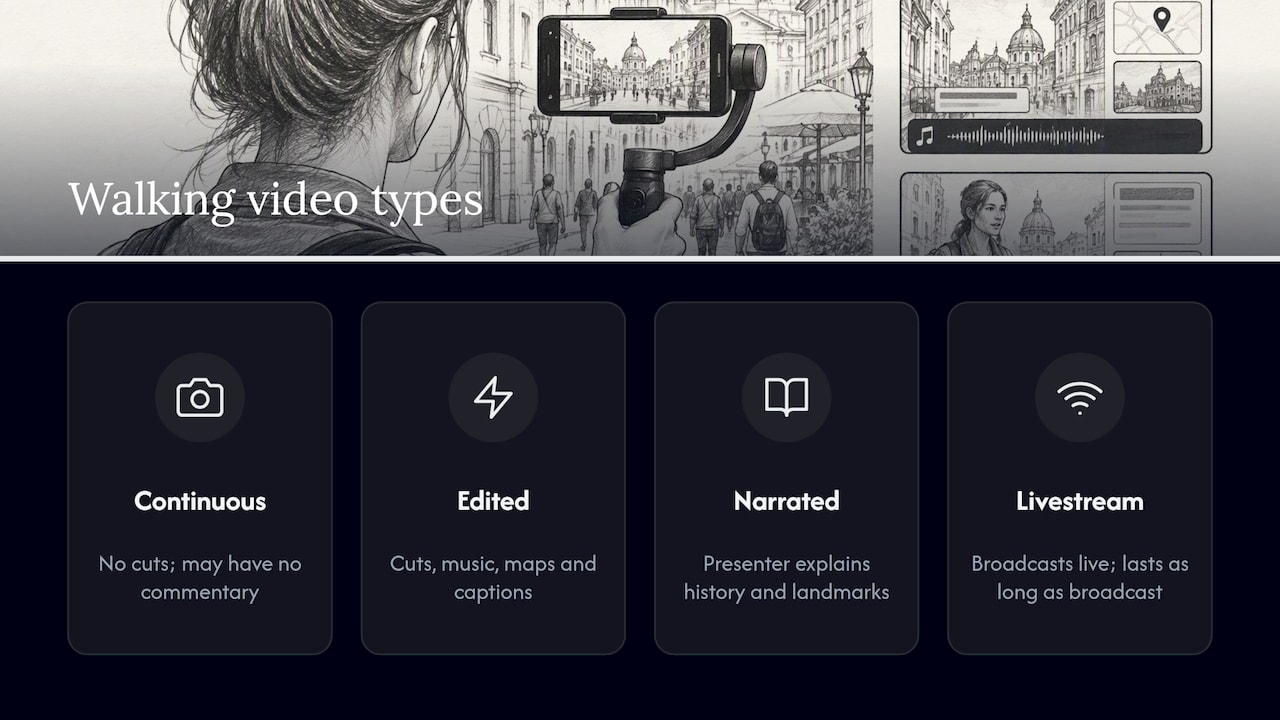
Continuous walk-throughs. One camera operator walks a route with a handheld or chest-mounted camera, often for one to several hours, with no cuts. Some creators film in real time with no music and no commentary. You hear footsteps, traffic, conversation and street musicians. These are the videos people put on a treadmill or a second monitor.
Edited highlights. A shorter video with cuts, music, maps and captions. It moves faster and covers more ground, but you lose the sense of how far apart things really are.
Narrated tours. A presenter explains history and landmarks as they walk. These sit closer to a guided tour, only without the chance to ask questions unless the format is interactive.
Livestreamed walks. A person walks with a camera and broadcasts as it happens. This is the only kind of walking video that is truly live, and it only lasts as long as the broadcast.
The common thread is movement. A walking video has a start, a route and an end, which makes it a different tool from a fixed camera pointed at one square.
Walking videos, live webcams and guided tours compared
People often ask whether a walking video is the same as watching a webcam. It is not, and the difference matters when you plan around it.
| City walking tour video | Live webcam | Guided tour | |
|---|---|---|---|
| Camera | Moves along a route | Fixed, sometimes with preset movement | Your own eyes, in person or on a call |
| Time | Recorded on a past day | Updates from the provider’s camera, when it is working | Happens when you book |
| Best for | Learning the layout, feel and pace of a place | Checking a specific view at a given moment | Context, stories, questions |
| Weakness | Date may be old, route is the creator’s choice | One angle, can go offline | Cost, schedule, group pace |
A guided tour puts a knowledgeable person in charge of the route and the explanation. A walking video puts the route in your hands: you can stop on a corner for ten minutes or skip ahead. For webcams, the key point is that a camera pointed at a street is only useful if it is currently delivering fresh images, and that is something to confirm on the provider’s page, not assume.
How walking videos help you explore and plan
Researchers writing about virtual tourism at EHL describe it as most valuable as a preview and research tool, because viewers can examine places repeatedly and assess routes or accessibility before committing to physical travel. That matches how people actually use these videos.
Learn the layout. Watching the walk from a train station to a museum shows you whether the way is a short stroll, a long avenue or a series of stairs and crossings.
Judge the neighborhood feel. A busy shopping street and a quiet residential block look different on screen in a way that a map cannot convey. Noise, crowds, sidewalk width and shade all show up.
Spot accessibility questions. Look for curbs, steep grades, cobblestones, narrow sidewalks and construction. A video will not tell you if a route works for your needs, but it tells you what to ask about.
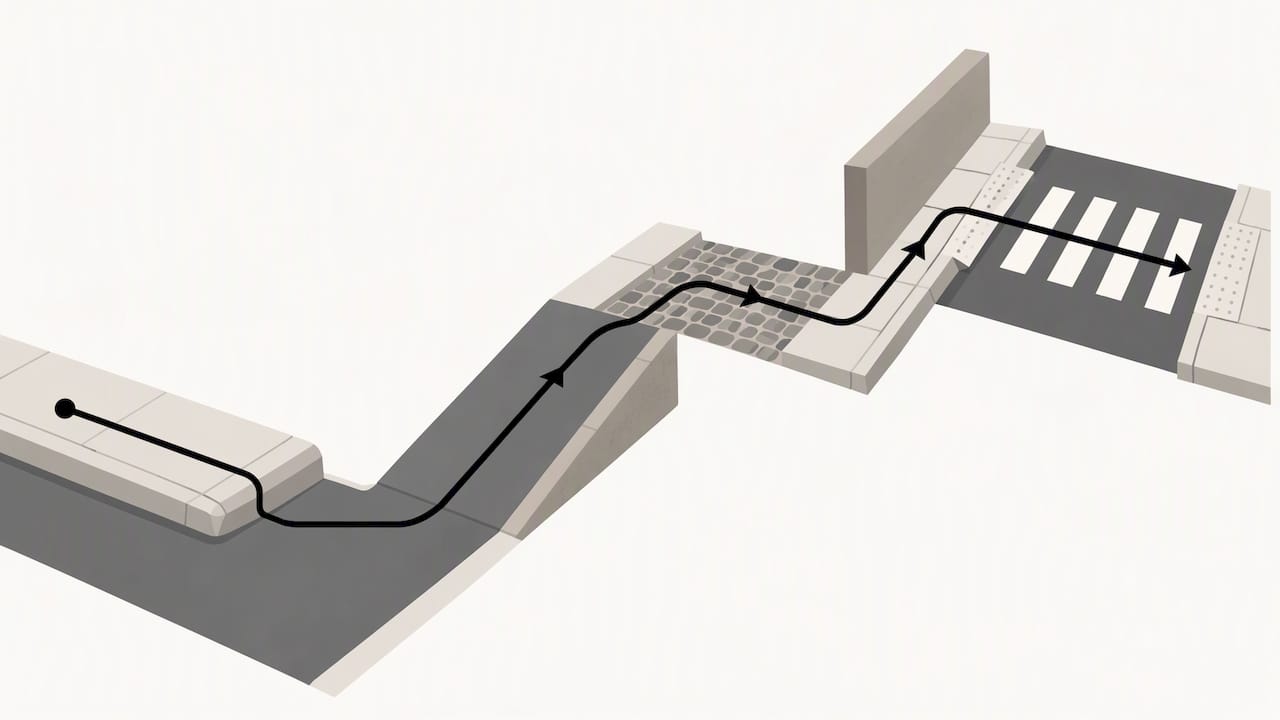
Build a rough route. Many people watch a segment, note the landmarks they pass and then use a map app to turn that into a plan.
Get a feel before you go. For a first trip to a large city, even an hour of footage can make the first morning less disorienting.
It also works the other way around. Once you know the neighborhood, a transit plan becomes easier to make. If your target is Kansas City, for example, a Kansas City public transportation guide pairs well with a walking video of the downtown streets you will cover on foot between stops.
What to check before you press play
A two-hour video is a real time commitment. Spend two minutes checking these things first.
Date of filming
Cities change. Shops close, scaffolding goes up, streets are pedestrianized or repaved. Look for the filming date in the description. If there is only an upload date, treat it as a rough guide. A video that is several years old is still good for the layout of old streets and landmarks, but not for what is open.
Route and coverage
The title should say which streets or neighborhoods the walk covers. Better videos list timestamps for landmarks in the description. If there are no chapters, scrub through the video to see whether it really covers the area in the title.
Continuous or edited
Continuous footage is better for judging distance and pace. Edited footage is better when you want a quick overview. Neither is wrong, but a video that jumps between places can make a short walk look long or a long one short.
Sound
Stars and Stripes described a style of walking video that uses a first-person camera, shows streets in 4K and keeps ambient sound without narration. If you want to hear the city, look for that. If you prefer explanation, search for narrated tours. If you plan to play the video in the background, check that there is no loud music added.
Camera stability and viewpoint
A handheld camera produces shake that some people find tiring, especially on a large screen. A stabilized or chest-mounted camera is smoother. Also note the camera height: it changes how wide a street feels.
Time of day and season
A walk at 7 a.m. in winter shows a different city from one at noon in July. If you plan to visit at a certain time, look for footage from a similar season and hour.
Crowds and privacy
Footage of busy streets will show many people. Reputable creators avoid focusing on particular individuals and avoid filming inside private spaces. If a video lingers on faces or enters places that look private, skip it.
What 4K really means for a walking tour
A 4K walking tour is simply a walking video recorded and delivered in ultra-high definition. It does not mean the route is better, the guide is better or the footage is more recent. It means you can see more detail, such as signs, building textures, menus in windows and the distance between crossings.
To get the benefit:
- Use a screen that can show it. A 4K video on a small phone looks much like a lower resolution. On a large TV or a good monitor the difference is visible.
- Have a steady connection. High-resolution streams need more bandwidth, and brief network dips can interrupt playback. If you see buffering, lower the resolution in the player settings. A smooth 1080p picture beats a stuttering 4K one.
- Check the real resolution. Some uploads are labeled 4K but were upscaled from lower quality footage. Judge by whether you can read distant signs.
A city walking video, by contrast, can be any resolution. The term describes the subject, a walk through an urban area, while 4K describes the image quality. Many of the most popular videos are both.
Watching on a TV, computer or treadmill
On a TV. Casting or using a TV app makes the most of large-format footage. Turn on subtitles if the video has narration in another language.
On a computer. A second monitor is handy for planning: video on one side, map on the other. Pause at a landmark and find it on the map.
On a treadmill. Real-time continuous walks work best, since the pace of the scene roughly matches a walking speed. Choose a route you find calming, and avoid shaky handheld footage if you tend to get motion sick.
On a phone or tablet. Good for short segments. Download videos on Wi-Fi if the platform allows it, so you do not use mobile data.
For accessibility. Look for captions, chapter markers and descriptions. If a video has no narration, a written route description can help you follow it. Playback speed controls are useful if you want a quick preview of a long walk.
Can a walking video show current weather or street conditions?
No, not reliably. A walking video shows the conditions on the day it was filmed. A sunny afternoon in the footage tells you nothing about tomorrow, and snow-free pavement in a video from last spring does not mean the sidewalks are clear today.
For conditions that matter, use official sources:
- For forecasts and warnings in the US, the National Weather Service publishes local forecasts, hazard alerts and marine and aviation forecasts.
- For road conditions in the US, 511 is the nationwide traveler information number that provides current information about roads and transit, and state or regional 511 services have their own sites and apps.
- For transit, check the local transit agency’s own page for service alerts.
A live webcam is a better companion for a quick look because it can show the present view, provided the provider’s feed is working. Even then it is one angle, may lag, and can go offline. Treat it as an extra glance, never as the basis for a decision about driving, hiking, flying or anything where safety is involved.
From a recorded walk to a current view
Here is a simple routine for planning a city visit.
- Watch a walking video of the area you will stay in, to learn the layout.
- Mark landmarks on a map and check walking distances.
- Look at a live webcam of a central square or skyline to see the view as it is now, if one is available from a reliable provider. Our guide to verifying city skyline webcams explains what to look for.
- Check the forecast and any alerts from the official weather service.
- Confirm opening hours and transit on the official sites of the places and agencies you plan to use.
The video gives you the character of the place, the webcam gives you a quick look at the present and official sources give you the facts you act on.
Find live views alongside your walking videos
GlobeWebcams is a directory, not a camera operator. We do not own or run the cameras. We list public or authorized webcams by location, country and category, link back to the original provider and apply source-rights, availability and quality checks before publishing a page. You can start with the worldwide webcam map or go straight to a country such as the United States, Canada or Australia. If you are curious how we check what we publish, read our methodology and the list of sources.
A webcam page is only as current as its provider’s feed. Open the provider link to confirm that the image is updating before you rely on it for anything beyond curiosity.
Rights and etiquette when you watch and share
If you only watch, there is little to worry about. If you plan to make or share your own walking video, a few principles apply, and laws differ by country and even by city, so check local rules.
- Music and other media. Background songs, artwork and clips from other creators are usually protected by copyright. Use material you own, or that is licensed for your use.
- People. Avoid centering particular individuals, and think twice before publishing footage of children or of people in sensitive situations.
- Private property. Filming inside shops, venues or private grounds usually needs the owner’s permission.
- Re-uploading. Do not copy another creator’s video and post it as your own. Link to the original instead.
The same logic guides our own directory: a camera being publicly viewable does not make its images free to reuse, which is why we link to the original provider.
Beyond city streets
Walking videos are one way to preview a trip. Others use fixed views for specific purposes: airport webcam views before a departure, cruise port webcams before boarding, zoo webcams for wildlife or golf course webcams before a round. For landscapes, our Iceland webcams page is a good place to start if you want scenery rather than streets.
FAQ
Are virtual walking tours free?
Many city walking videos are free to watch on video platforms and creators’ own sites, and they usually have no live guide. Some paid virtual tours offer a guide and questions in real time, so check what is included before you pay.
Is a walking tour video the same as a live webcam?
No. A walking video is a recording of a route on a past day, while a live webcam is a fixed camera whose image updates while the provider’s feed is working. Use the video to learn the place and the webcam for a quick look at the present.
Do I need 4K to enjoy a city walking video?
No. 4K gives more detail on a large, capable screen, but a clear 1080p stream is fine on most devices. If a 4K video buffers, lower the resolution rather than putting up with stuttering.
Can I use a walking video to check if a street is open or the weather is good?
No. The footage shows conditions on the day of filming. Check the National Weather Service for forecasts and your state’s 511 service for road conditions, and treat any webcam as a supplement.
How do I find a walking video for a specific city?
Search the city name with words like walking tour, 4K or real time, then check the filming date, the route in the description and whether the footage is continuous. Adding the neighborhood or the season narrows the results.
Sources
- Virtual Tourism: Gimmick or Gamechanger? (EHL Insights)
- Rambalac shows a different side of Japan with Videowalks (Stars and Stripes)
- National Weather Service
- About 511 (FHWA Traveler Information)
Recommended
- Verify City Skyline Webcams in One Click
- Cruise Port Webcams: Official Views and Five
- Controllable Webcams: How Public Pan-Tilt-Zoom
Webcam availability and conditions can change without notice. GlobeWebcams does not operate most listed cameras; feeds and imagery remain under the control of their original providers. Do not rely on webcam imagery alone for weather, road, travel or safety decisions.