Campground Webcams: How to Find Them and Read Them Well
Campground webcams are cameras that show a campsite, a park entrance, a launch ramp, a lake or a nearby overlook, and you can use them to get a rough look at conditions before you drive. They work best as one input among several: the image tells you what the view looked like when it was captured, not what your site will be like when you arrive. Below you will find where these cameras usually come from, how to confirm a view is recent, what to look for in the frame, and where webcams stop being useful.
GlobeWebcamsglobewebcams.comExplore Campsites Before You GoBrowse webcams by location, country, or category to see views near your destination, with links back to each original provider.Explore webcams on the mapTL;DR
- Most useful “campground” views come from three places: a campground’s own site, a national or state park’s webcam page, and a directory that links back to the original provider.
- Always check the timestamp. Park pages say how often images refresh, and some tell you to check the image date to be sure it is current.
- Read the frame for sky, snow or standing water, vegetation, lake level and crowds. Treat it as context, not a forecast.
- Never decide on weather, roads or safety from an image alone. Use the official forecast, road report and ranger or campground office as well.
- You can browse webcams by country, category and place on GlobeWebcams, which links to each original provider.
Table of Contents
- What a campground webcam actually shows
- Where to find campground and camping webcams
- How to tell whether a view is current
- What to look for in the frame
- Planning around a trip: a simple routine
- What webcams cannot tell you
- Using GlobeWebcams to explore before you go
- Common mistakes to avoid
- FAQ
- Sources
What a campground webcam actually shows
The phrase covers several kinds of camera, and they answer different questions.
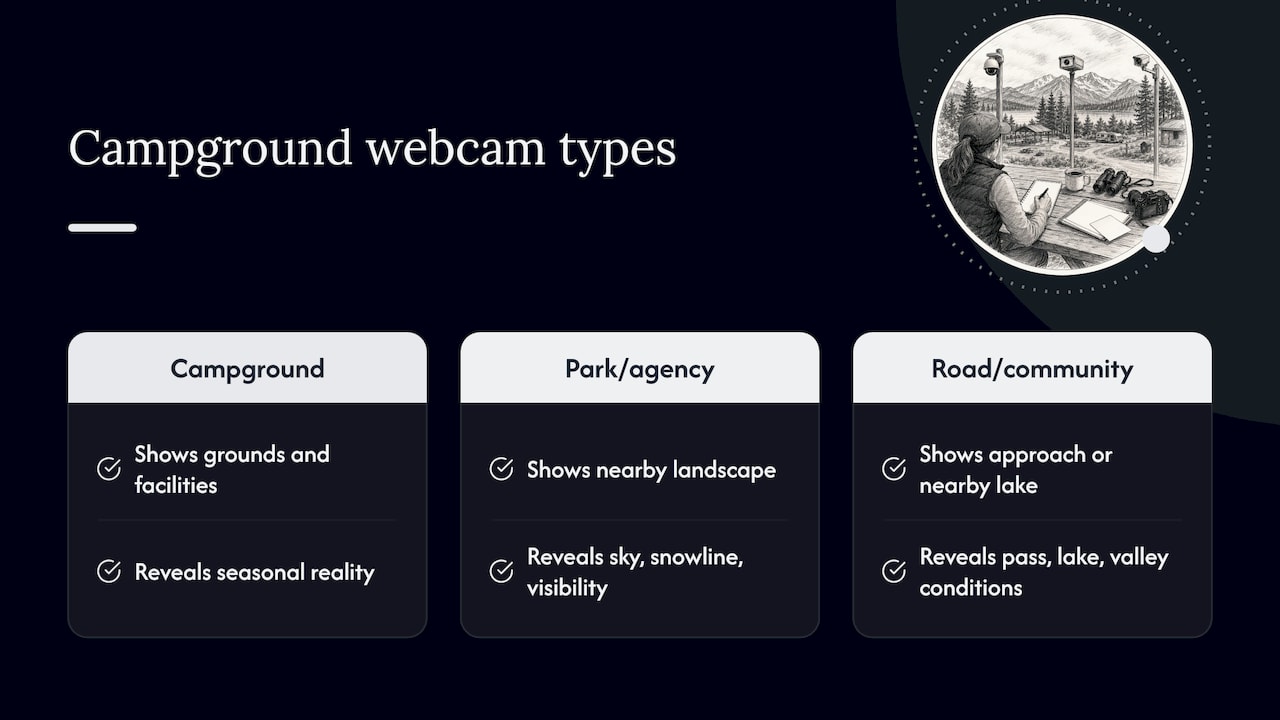
Cameras run by the campground itself. A private campground may point a camera at its grounds so prospective guests can see the place. One campground in Savoie, France, explains that its webcam shows real-time atmospheric conditions and the actual state of facilities such as pools or vegetation, which helps visitors choose accommodations. The same operator describes live footage as a way to avoid gaps between marketing photos and seasonal reality. That is the best case for this kind of camera: it shows the real place in the real season.
Cameras run by parks and land agencies. In the United States, the National Park Service publishes webcam pages for many parks. These rarely point at a specific campsite. They show entrances, overlooks, launch ramps, geysers, peaks or valleys near where you will camp. For trip planning, that is often more useful than a picture of a tent pad, because it shows the sky, the snowline and the visibility around your destination.
Cameras run by other agencies and communities. Highway departments, weather services, ski areas, harbors and local tourism offices operate cameras that happen to cover the approach to a campground or the lake beside it. They are not campground cameras in a strict sense, but they answer the questions campers ask: is the pass clear, is the lake calm, is there fog in the valley.
Knowing which type you are looking at changes how you read it. A campground’s own camera is about the facility. A park camera is about the surrounding landscape. A road or weather camera is about the conditions on the way.
Where to find campground and camping webcams
There is no single master list of every camera near every campsite, so you will usually combine a few routes.
Start with the campground or the managing agency
If you already have a campground in mind, check its own website and the website of the agency that manages the land. Look for pages labeled webcams, live views or conditions. Many do not have one, and that is normal. Small and publicly managed campgrounds often have no camera at all.
When the campground has no camera, move one step out. Search for the park, lake, forest or town it sits in. A nearby visitor center, marina or entrance station camera may give you what you need.
Use park webcam pages for scenic and conditions views
National parks and recreation areas are a strong source because the agency names what each camera shows and, in many cases, how often it updates. A few examples from official pages:
- The Crater Lake National Park webcam page includes a gallery of interesting images captured by its webcam in the past and invites visitors to report noteworthy views.
- The Grand Canyon National Park webcam page for Yavapai Point includes weather and air-quality information and advises users to check the image date to be sure it is current.
- The Glen Canyon National Recreation Area webcam page says its Stateline Auxiliary Launch Ramp, Wahweap Main Launch Ramp and Paria Overlook images update every 10 minutes.
If you are planning around a national park, our guide to finding national park webcams fast walks through map search and the checks worth making before you trust a feed.
Browse a directory by place and category
A directory saves you from hunting through dozens of agency sites. On GlobeWebcams you can open the United States webcam listings, narrow by state, park or category, and follow a link back to the original provider. A few places where camping trips often begin:
- Redwood National and State Parks, useful for coastal fog and forest light.
- Isle Royale National Park, for island and lake views on Lake Superior.
- The Grand Lake entrance camera on U.S. Highway 34 at Rocky Mountain National Park, a good example of an entrance view that tells you about weather and traffic near the park’s western side.
GlobeWebcams does not own or operate these cameras. Each page points to the provider that does, and our sources page explains how we attribute them.
Search by what you need to see
Sometimes the right question is not “which campground” but “what do I need to see.” If you are camping in the mountains, try mountain webcams for trips. If your trip is built around a coast, live surf webcams show the water your beach campground faces. If you hope to watch animals or landscapes, see our notes on reliable live nature webcams and on wildlife webcams and whether a feed is live.
How to tell whether a view is current
This is the step most people skip, and it matters more than any other. A camera page can look perfectly normal while showing an image that is hours, days or months old.
- Look for a timestamp on the image. Many cameras burn a date and time into the picture. Compare it with the current time in the camera’s own time zone.
- Read the page’s refresh note. Some agencies state the interval. Glen Canyon’s launch ramp and overlook images, for example, are stated to update every 10 minutes. A page that gives no interval gives you less to go on.
- Look for the page’s own warning. The Grand Canyon page advises checking the image date. Take that advice for any camera.
- Check that the scene is plausible. If the page shows bright midday sun and it is dark where the camera is, the feed is stale or the clock is off. Shadows, lighting and weather should match what you know about the time of day.
- Reload and compare. If a stream or image does not change after a refresh and a few minutes, treat it as unreliable.
- Watch for seasonal stand-ins. Some pages keep an old image or an archive photo when a camera goes down. A gallery of past images, like the one at Crater Lake, is labeled as past captures. Make sure you are looking at the live view and not the gallery.
We apply availability and quality checks before publishing a webcam page, but a camera can fail at any moment after we check it. We do not describe any view as live or operational unless the source supports that, and you should confirm with the timestamp every time.
What to look for in the frame
Once you know the image is recent, use it to answer specific questions. Here is a practical checklist for a camping trip.
Sky and visibility
Is the sky clear, overcast or hazy? Can you see the far ridge or is it lost in cloud? On a day when you want a sunrise or a view of the stars later, a clear afternoon sky is a good sign but not a promise. Some park pages pair the image with air-quality readings, which is a better indicator of smoke or haze than your eyes on a small picture.
Snow, ice and mud
In shoulder seasons, the question is often whether the campground is open and accessible. A camera that shows snow on the road or the surrounding slopes tells you the season has not turned yet. A camera that shows bare ground tells you only about that one spot. Higher campsites can sit in winter conditions while a camera lower down looks like spring.
Water levels and conditions
Launch ramp cameras and lake views help you see whether water looks high, low, calm or choppy. Remember that a calm surface at one moment says nothing about wind later in the day, and a camera cannot tell you about currents, temperature or hazards under the surface.
Vegetation and the season
The French campground example is a good reminder: webcams can reveal the actual state of vegetation and facilities, which marketing photos taken in peak summer will not. Green or brown, leafed out or bare, flowers or fallen leaves, you can read the season at a glance.
Crowds and parking
Entrance and parking area cameras give you a feel for how busy a place is. If the lot at the entrance looks full at a time you plan to arrive, you may want a backup plan. This is a rough impression and not a count of open campsites.
Planning around a trip: a simple routine
Here is a routine that works for a weekend at a campground.
Several days before. Look at the official forecast for the area, then open the nearest webcams to see how the landscape looks. Note what the camera shows now so you can compare it later. Check the campground’s own page or the agency page for closures, fire restrictions and alerts.
The day before. Check the forecast and road conditions from the official sources again. Open the webcams to see whether anything has changed overnight, such as a fresh dusting of snow, smoke, or fog in the valley.
The morning you leave. Look at the entrance camera and any road cameras. If something looks off, call the campground office or the park’s information line.
At arrival. Your own eyes replace the camera. Look at the real site, the sky and the water before you set up.
A webcam is fast and free, so it is worth checking at each of these points. Just keep it in its place, as one more piece of information.
What webcams cannot tell you
A camera shows a narrow slice of a place at one moment. Several things sit outside it:
- Whether a site is available or the campground is open. Only the campground or managing agency can tell you that.
- Road conditions beyond the frame. A clear entrance does not mean a clear route. Use official road reports and, where relevant, the state transportation department. Do not rely on webcam imagery alone for road, weather or safety decisions.
- Forecast. A picture shows now, not the next six hours. Thunderstorms, wind and temperature drops are not visible until they arrive.
- Hazards. Fire, flood, wildlife and avalanche conditions are the business of the responsible agencies, which publish alerts and closures. A quiet-looking image does not override them.
- Facility quality. A camera view of a lake does not tell you about restrooms, water supply, noise or neighbors.
The Savoie campground makes a fair point that live footage helps visitors avoid surprises between brochure and reality, and that is the right way to think about it. A webcam narrows the gap, it does not close it.
Using GlobeWebcams to explore before you go
If you want a map-first way to look around a region, the GlobeWebcams map lets you browse public or authorized webcams by location, country, category and source. Open a place page to see the view, the provider name and a link to the original source. You can start with a region you plan to camp in, zoom to the park or lake, and then compare several cameras at different elevations or sides of the area. We link back to the original providers and apply source-rights, availability and quality checks before publishing, so you can see where each image comes from and go to the provider for the current status.
GlobeWebcams is a discovery site. We do not run the cameras and we do not take campground reservations. Use the provider and the campground or agency for those.
Common mistakes to avoid
Treating a stale image as a live one. Always check the timestamp and refresh note.
Assuming one camera represents the whole area. Elevation, aspect and distance change conditions quickly, especially in mountains and along coasts.
Ignoring time zones. A camera in another time zone can look odd at your local time. Convert before you decide that something is wrong.
Skipping the official sources. The webcam is a visual aid. The forecast, the closure notice and the campground office are the authority.
Expecting every campground to have a camera. Most do not. Look at nearby entrances, overlooks, ramps and town cameras instead.
FAQ
Do campgrounds have live webcams?
Some do, mostly private campgrounds that want to show guests the real grounds and season. Many public campgrounds have no camera of their own, but the park, lake or town around them often does. Check the campground’s page first, then the managing agency.
How do I find camping webcams near a specific park?
Start with the park’s official webcam page if it has one, then use a directory such as the GlobeWebcams United States listings to find nearby cameras by place and category. Follow each link to the original provider to see its timestamp and refresh details.
How can I tell if a campground webcam is up to date?
Look for a timestamp in the image, read any refresh interval the page gives, and check that the lighting matches the time of day. Park pages sometimes say how often images update, and the Grand Canyon page advises checking the image date. If the image never changes on reload, treat it as unreliable.
Can I use a webcam to decide whether to go camping?
Use it as one input. A webcam can show sky, snow, water and crowds near your destination, but it cannot replace the official forecast, road report or alerts. For safety and travel decisions, rely on those sources and on the campground or park staff.
Does GlobeWebcams own the cameras it lists?
No. We link to public or authorized webcams run by other providers and show attribution to the original source. Availability can change at any time, so confirm the current view on the provider’s page.
Sources
- Campsite webcam: live view over Savoie (Camping Eden de la Vanoise)
- Webcams, Crater Lake National Park (U.S. National Park Service)
- Webcams, Grand Canyon National Park (U.S. National Park Service)
- Webcams, Glen Canyon National Recreation Area (U.S. National Park Service)
Recommended
- Find National Park Webcams Fast: Map Search
- Snow Cameras Live: How to Read Them Before You Go
- Rainforest Webcams: Where to Watch and How to…
- Mountain Webcams for Trips: Find Feeds, Check…
Webcam availability and conditions can change without notice. GlobeWebcams does not operate most listed cameras; feeds and imagery remain under the control of their original providers. Do not rely on webcam imagery alone for weather, road, travel or safety decisions.